Track Competitor Moves Across X and Web
Zero monitors competitor X accounts, scrapes websites and pricing pages for changes, diffs against last week, and posts a digest to Slack on schedule.
Zero connects:


What Zero delivers
What the problem is
Keeping up with competitors should be a weekly habit. In practice, it happens when someone spots something on X, forwards a tweet to Slack, and the thread dies two days later with no action. Meanwhile, a competitor quietly drops their free tier or adds an enterprise plan, and you find out three weeks later from a prospect who already chose them. Zero takes the whole process off your plate. It checks their X accounts, reads their product pages and pricing pages for changes, compares against last week's data, and posts a structured digest to Slack every Monday.
How Zero fixes it
Step 1: Connect your tools
Step 2: Ask Zero
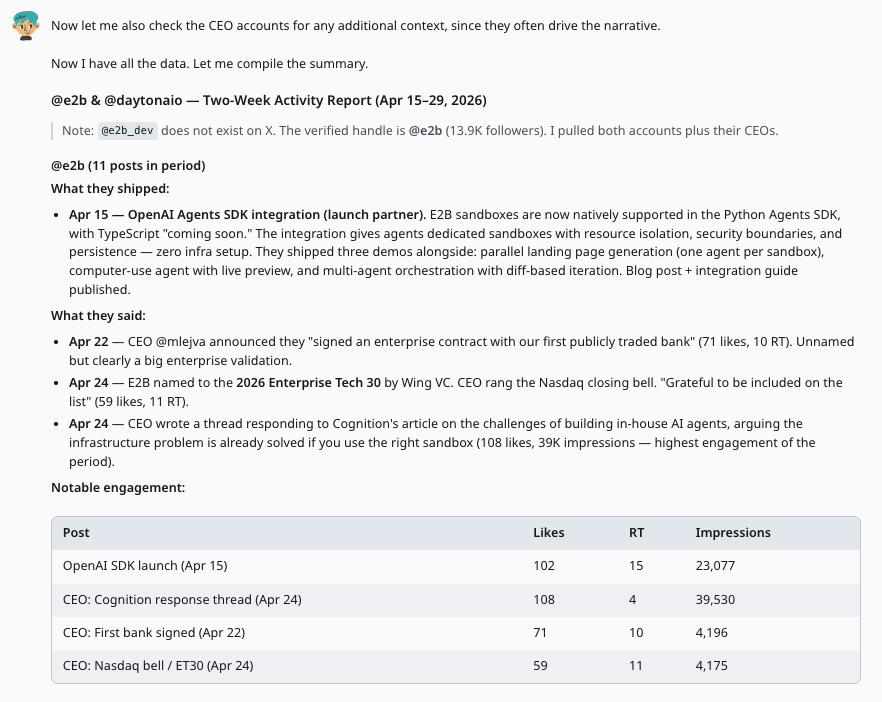
@Zero every Monday at 9am, scan the last 7 days of posts from @e2b_dev, @daytonaio, and @replit on X. Check their websites for new product announcements. Scrape their pricing pages and compare against last week's Notion snapshot. Save findings to the Competitor Intelligence database in Notion and post a digest to #competitive.
Zero scans competitor X accounts and websites
Zero pulls recent posts from each competitor handle, extracts product announcements and positioning. It also scrapes product pages, changelogs, and blogs for new content, flagging feature launches or repositioning since the last scan.
Zero diffs pricing pages against last week
Zero fetches each competitor's pricing page, compares it against the snapshot saved in Notion last week, and flags changes to tiers, prices, feature lists, trial offers, or calls to action. Each change gets a short impact summary.
Findings saved and digest posted
Zero saves a structured record to your Notion Competitor Intelligence database and posts a concise weekly digest to Slack covering product moves, messaging shifts, and pricing changes in one view.
Step 3: Take it further
Tips for better results
Run an initial scrape first to set the baseline in Notion. Without it, Zero has nothing to diff pricing pages against and will treat everything as new.
Give Zero specific signals to watch for. 'Flag posts about pricing, integrations, or funding' produces tighter digests than a general sweep.
Structure your Notion database with properties like Competitor, Category, Change Type, and Date so you can filter and trend over time.