Five workflows that the VM0 team runs every week. Each one shows the setup, the prompt, the artifact Zero produces, and the time it pays back.
The point isn't to copy these verbatim — it's to see the shape of a complete Zero workflow and adapt it to your own work.
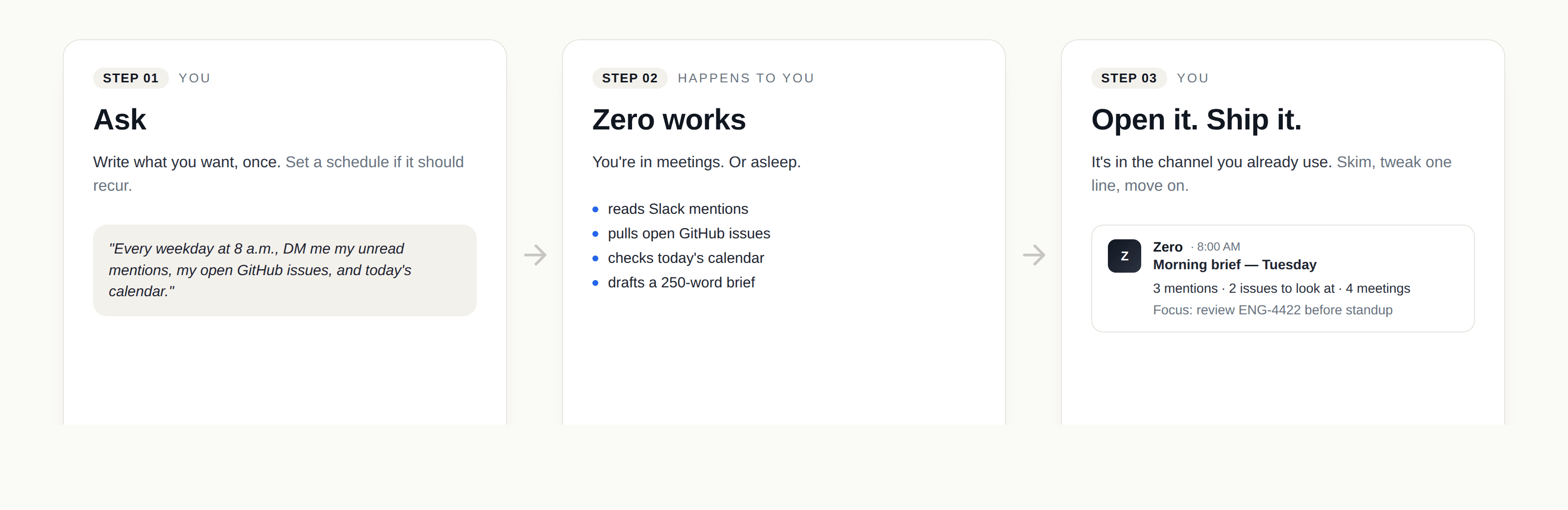
1. Morning brief
The pain. Every morning starts with a catch-up: open Slack, scan @mentions, check calendar, glance at open PRs. Twenty minutes before the first real task.
Setup. One schedule, weekdays at 8 a.m. Connectors: Slack, GitHub, Google Calendar.
Prompt.
"Every weekday at 8 a.m. Beijing time, DM me with four sections:
- Unread Slack @mentions from the last 24 hours, with one-line summaries
- GitHub issues assigned to me, sorted by age, with status and last comment
- Today's calendar — meeting titles, times, and the relevant Notion doc if linked
- One suggested focus for the day, based on what's overdue or blocking others"
What you get back. A Slack DM at 8 a.m., usually 200–350 words. Each section is short; numbers are concrete; links are inline. The "suggested focus" varies — sometimes it's an obvious PR; sometimes it's a meeting prep that needs more attention than the day calls for.
Pays back. Roughly 20 minutes a day, plus the cognitive cost of context-switching across four tools first thing.
Variations. Add a fifth section for new customer signups, or for production errors from Sentry. Replace Slack DM with an email if you prefer mornings without notifications.
2. Competitor weekly
The pain. Knowing what competitors shipped last week is useful. Manually checking three X accounts, three changelogs, three pricing pages, and one blog roll is a chore that quietly slips.
Setup. A skill (competitor-scan) plus a Monday-morning schedule. Connectors: X, web search, Notion.
Prompt.
"Scan @competitor1, @competitor2, @competitor3 on X and their changelogs since last Monday. Cross-reference with their pricing pages and any blog posts. Diff against last week's baseline (Notion page 'Competitor State'). Post a digest to
#competitor-intelhighlighting: new features, pricing changes, hiring signals, and anything notable in tone or messaging."
What you get back. A Slack thread on Monday morning. Top-level message: a 5-bullet summary. Replies: per-competitor sections with quoted updates and links. The Notion baseline page is updated automatically so next week's diff has fresh ground truth.
Pays back. Roughly 90 minutes per week, plus the off-camera mental load of "I should check on Acme."
Variations. Add Reddit and Hacker News for community sentiment. Add a quarterly retrospective that summarizes the year's diffs into a board-ready slide.
3. Bug triage
The pain. Someone drops a screenshot or vague description in #bug-report. It needs to become a real GitHub issue with repro steps, a severity, a label, and a team. That formalization step is small but constant.
Setup. A skill (triage-bug-report), invoked manually by @Zero in #bug-report. Connectors: Slack, GitHub.
Prompt (in the channel):
"@Zero triage this — extract repro steps from the screenshots and thread, search for related GitHub issues, classify severity (P0–P3), assign to the most likely team based on the file paths or symptoms, and file a new issue if it's not a duplicate. Reply in this thread with the link."
What you get back. A threaded reply within ~60 seconds: a GitHub issue link, the chosen severity with a one-line justification, a list of 2–3 related issues for context, and the assigned team. If Zero thinks it's a duplicate, it posts the original issue link instead of filing a new one.
Pays back. Across a busy week, this is the difference between a clean issue tracker and a backlog of un-triaged Slack screenshots.
Variations. Add a "customer-facing" tag based on whether the reporter is from outside the company. Auto-page on-call for P0.
4. Customer reply draft
The pain. A customer email needs a response that's helpful, on-brand, and grounded in the docs. Five minutes per email × 30 emails a week is a real cost.
Setup. A skill (customer-reply-draft), invoked manually by forwarding an email to Zero or pasting into chat. Connectors: Gmail, Notion (or your help center), Stripe (for billing), Linear (for known issues).
Prompt.
"Customer wrote this email [paste]. Read their last three tickets, check our docs for the relevant section, check Linear for any known issues that match their report, and check Stripe for any billing context. Draft a reply in their language. Cite the docs section. Keep it under 150 words. Match the tone of our last support reply to them."
What you get back. A draft reply with citations linked at the bottom — usually two or three doc links, plus a heads-up like "Linear ENG-4422 is a known issue with this; ETA next week." You skim, tweak one line, send.
Pays back. Roughly 3–4 minutes per email. Across a support week, that's hours.
Variations. Auto-detect customer tier from Stripe; route VIP customers to a draft-only flow (no auto-send) and lower-tier customers to a high-confidence auto-send queue.
5. Weekly content production
The pain. Marketing wants one blog post, three LinkedIn posts, and a set of social cards every week. Each piece needs context from research and existing content. Coordinating it across tools is more work than the writing.
Setup. A multi-step skill (weekly-content) on a Friday-afternoon schedule. Connectors: Notion (research), Plausible (analytics), Fal (image generation), Loops (email).
Prompt.
"Every Friday at 2 p.m., do the following:
- Read this week's new Notion docs in the 'Marketing Inputs' database
- Cross-reference with last week's blog topics to avoid repeats
- Draft one 800-word blog post on the most timely topic; save to Notion in 'Blog Drafts'
- Draft three LinkedIn variations of the same idea — one essay, one listicle, one personal story
- Generate three square social cards in our brand style
- Post the bundle to
#marketingfor review"
What you get back. A single Slack message Friday afternoon containing all six artifacts inline. The blog draft links to a Notion page that's already styled. The LinkedIn drafts are copy-paste ready. The social cards are downloaded and ready to attach.
Pays back. Roughly a half-day of weekly coordination. Editors review and ship; they don't draft.
Variations. Add an A/B test where Zero generates two headlines and runs them past a small audience via Loops. Add a Plausible check for last week's top-performing topics to bias topic selection.
Each of these workflows took 10–30 minutes to set up. After that they pay back daily or weekly. The cost is roughly the credits each run consumes — visible per chat on the Usage page. See Credits & billing for the math.
To build your own version, copy one of these prompts, replace the names of your tools and channels, and try it. Iterate from the result.