An agent is a teammate-shaped AI that lives in your workspace. It has a name, a role, a personality, a set of skills it's good at, and a set of connectors it can reach. You talk to it the same way you'd talk to a colleague.
Zero is the default agent that ships with VM0 — the generalist that handles ad-hoc requests, drafts, briefings, and most everyday work. Most workspaces start with just Zero. As your use grows, you can shape additional agents around specific jobs.
Why agents, not one giant assistant
A single "do anything" assistant is hard to reason about. You don't know what it knows, what it can touch, or how it will behave on the next request. Agents fix that by being specialists with a stable shape:
- A clear job. Each agent has a name and a one-line description of what it's for. "Lisa drafts and sends customer replies." "Tim handles weekly competitor scans."
- A focused skill set. Agents load only the skills relevant to their job, so their behavior is predictable. They won't suddenly start writing code if their job is bookkeeping.
- Their own connectors. Each agent has its own permission grants. Your finance agent can touch Stripe; your marketing agent can't.
- A personality. Tone, voice, and defaults are set once on the agent and apply to everything it does.
How you interact with agents
The shape of "talking to an agent" depends on the channel:
- Web chat — pick the agent from the sidebar. Each agent has its own chat history.
- Slack —
@-mentionZero. Slack only routes to Zero; to hand the work to a different agent, switch agents from the controls in Zero's reply and continue inside the same thread. - Schedules — assign a schedule to a specific agent so the right one runs at the right time.
If you don't pick an agent, Zero handles the request.
Agents are isolated
Each agent runs alone. Agents in the same workspace can see each other in the roster — names, jobs, who's on duty — but they have no shared memory, no message passing, and no ability to call one another. Every chat belongs to exactly one agent, and that agent does the work end-to-end.
This is on purpose:
- Predictable behavior. A chat with Lisa stays a chat with Lisa. You always know whose voice, skills, and permissions are in play.
- Predictable permissions. A connector granted to your finance agent doesn't leak to your marketing agent. There's no chain of "Lisa asks Tim asks Zero" that would silently widen the blast radius.
- Predictable cost. Every credit is attributed to the agent that ran the chat. No hidden cross-agent traffic.
When a workflow spans multiple kinds of work, you compose it with humans, schedules, or the same agent loading different skills — not with agents calling each other.
Creating an agent
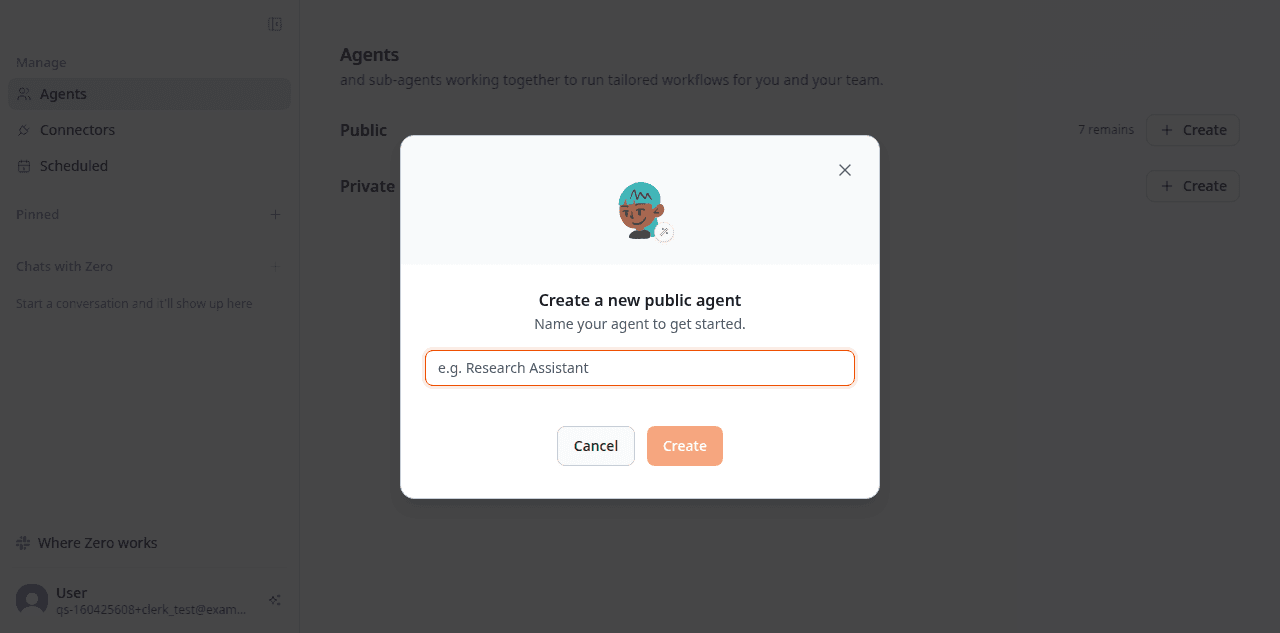
Open the Agents page in your workspace and click Create under Public (visible to your whole team) or Private (just for you). You'll start with a name and an avatar:
Once the agent exists, open its profile and fill in the rest — description, voice, instructions, and the connectors it's allowed to touch:
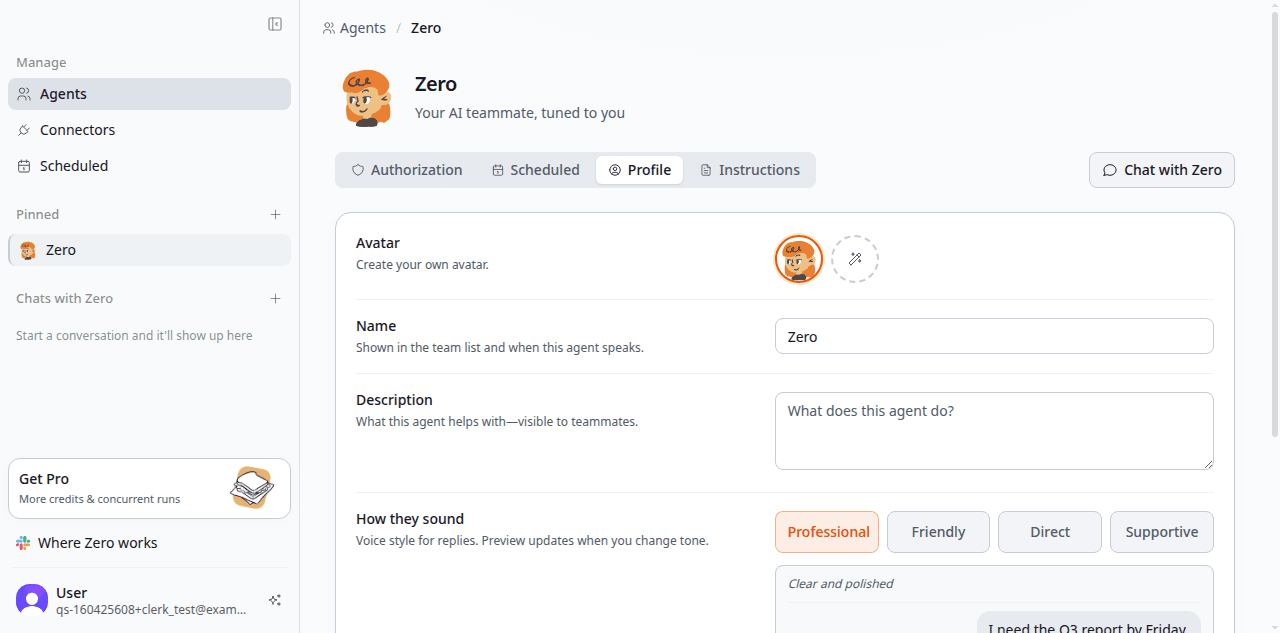
- Description. One sentence on what this agent helps with. The clearer this is, the better the agent behaves and the easier it is for teammates to pick the right one.
- How they sound. Pick a tone preset (Professional, Friendly, Direct, Supportive) or override it in the Instructions tab.
- Instructions. Default language, default reply length, and any persona quirks live in the Instructions tab.
- Connectors. Grant access to the tools this agent needs from the Authorization tab. Defaults are read-only.
Most teams iterate on these settings during the first couple of weeks. The agent's behavior tightens as you watch what it does and refine the description.
Agents and skills
Skills are reusable; agents are who runs them. The same skill — say, weekly-metrics — can be assigned to two different agents and produce different results, because each agent brings its own tone, defaults, and connector grants.
A common pattern:
- Generalist agents (Zero) load a wide skill catalog and pick situationally.
- Specialist agents (Lisa, Tim) load a narrow set and apply them consistently.
See Skills for how to write and share procedures across agents.
Agents and permissions
Each agent has its own permission grants. A connector connected at the workspace level isn't automatically available to every agent — you choose which agents can use it from the agent's Authorization tab. This means:
- A junior agent can't accidentally touch production systems.
- A customer-facing agent can post to Slack
#cs-repliesbut not to#exec-strategy. - A finance agent can read Stripe but only the CFO can hand it write access.
When an agent tries to do something outside its grants, the action is denied and logged.
What's next
- Spin up a specialist agent for a recurring workflow — see Skills for the building blocks.
- Put an agent on a schedule so it runs without prompting.
- See Permissions for fine-grained control over what each agent can touch.